
Lossless Context Management for long-horizon LLM agents









LLMs suffer from context rot: accuracy degrades 30–40% before hitting nominal token limits — not because the model runs out of space, but because reasoning quality collapses as the window fills with stale content.
The standard fix — telling the model to "summarize itself" — is unreliable. The model may silently drop constraints, forget file paths, or produce a summary that is itself too large.
mnesis solves this by making the engine — not the model — responsible for memory. It is a Python implementation of the LCM: Lossless Context Management architecture.
Benchmarks
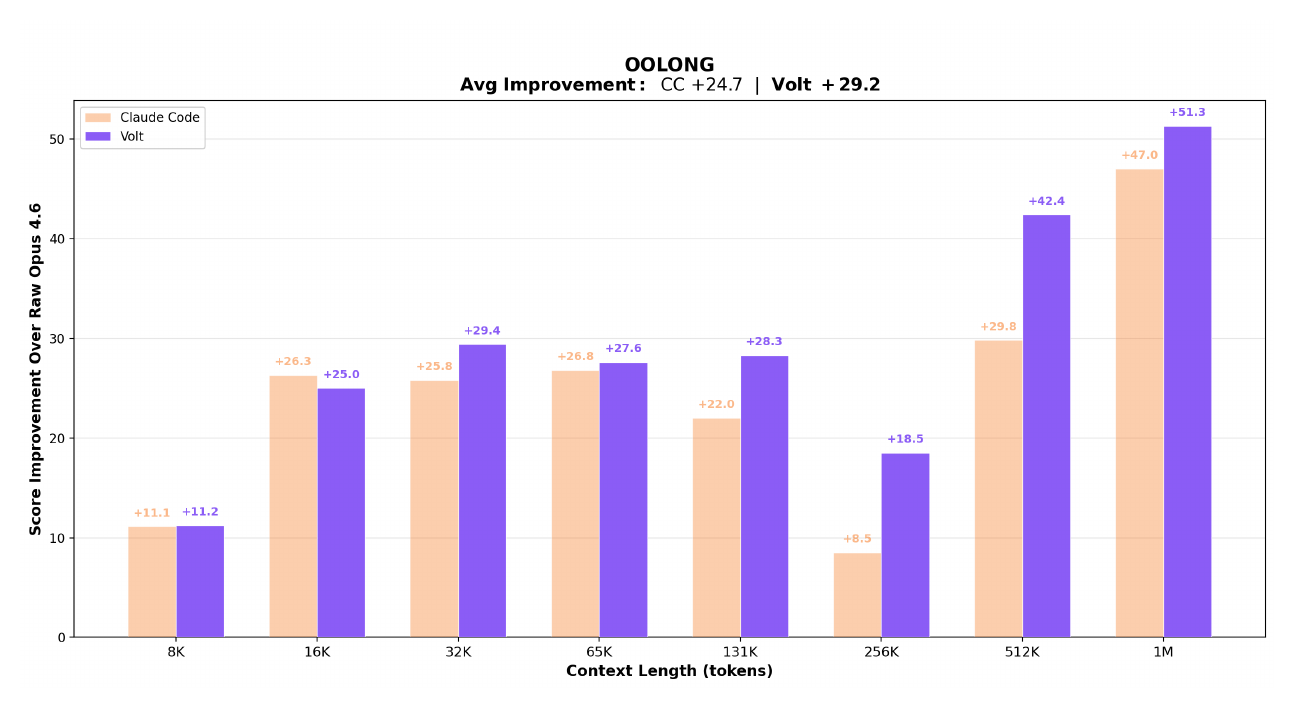
Evaluated on OOLONG, a long-context reasoning and aggregation benchmark. Both LCM-managed and Claude Code agents are built on Claude Opus 4.6; the gap comes entirely from context architecture.
The charts below compare LCM-managed context against Claude Code and unmanaged Opus 4.6 across context lengths from 8K to 1M tokens.
Score improvement over raw Opus 4.6 at each context length:
Absolute scores vs raw Opus 4.6 baseline:
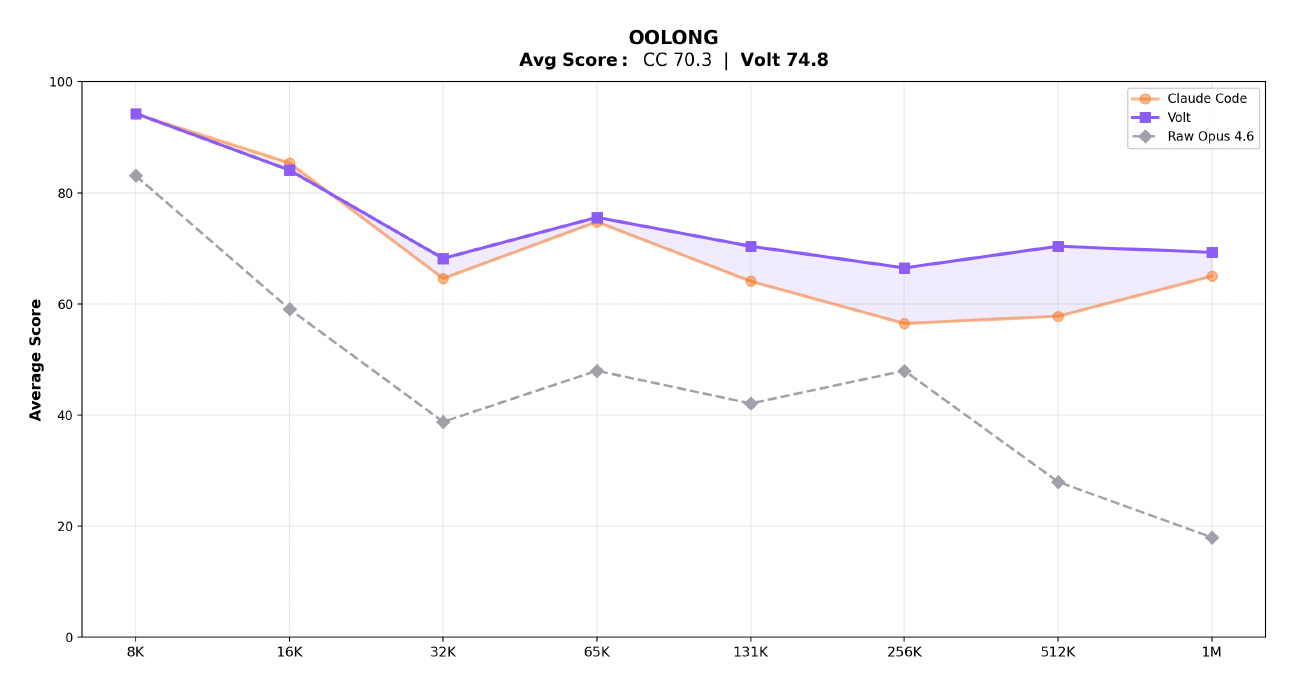
Raw Opus 4.6 uses no context management — scores collapse past 32K tokens.
How it works
Traditional agentic frameworks ("RLM" — Recursive Language Models) ask the model to manage its own context via tool calls. LCM moves that responsibility to a deterministic engine layer:
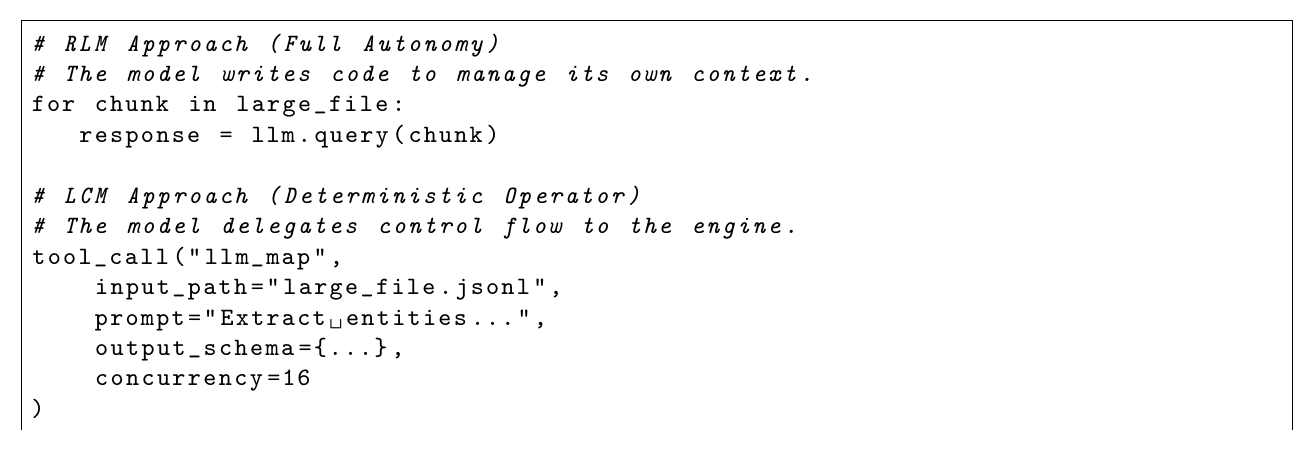
The engine handles memory deterministically so the model can focus entirely on the task.
Key properties
| RLM (e.g. raw Claude Code) | mnesis | |
|---|---|---|
| Context trigger | Model judgment | Token threshold |
| Summarization failure | Silent data loss | Three-level fallback — never fails |
| Tool output growth | Unbounded | Backward-scan pruner |
| Large files | Inline (eats budget) | Content-addressed references |
| Parallel workloads | Sequential or ad-hoc | LLMMap / AgenticMap operators |
| History | Ephemeral | Append-only SQLite log |
Quick Start
uv add mnesis
import asyncio
from mnesis import MnesisSession

async def main():
    async with MnesisSession.open(
        model="anthropic/claude-opus-4-6",
        system_prompt="You are a helpful assistant.",
    ) as session:
        result = await session.send("Explain the GIL in Python.")
        print(result.text)

asyncio.run(main())
MnesisSession.open() is the recommended entry point — it creates the session and acts as an async context manager in a single call. For manual lifecycle control, use await MnesisSession.create(...) instead (returns the session directly; call await session.close() when done, or use it as an async context manager with async with await MnesisSession.create(...)).
No API key needed to try it — set MNESIS_MOCK_LLM=1 and run any of the examples.
Provider support
mnesis works with any LLM provider via litellm. Pass the model string and set the corresponding API key:
| Provider | Model string | API key env var |
|---|---|---|
| Anthropic | "anthropic/claude-opus-4-6" |
ANTHROPIC_API_KEY |
| OpenAI | "openai/gpt-4o" |
OPENAI_API_KEY |
| Google Gemini | "gemini/gemini-1.5-pro" |
GEMINI_API_KEY |
| OpenRouter | "openrouter/meta-llama/llama-3.1-70b-instruct" |
OPENROUTER_API_KEY |
See the Provider Configuration guide for the full provider configuration guide.
BYO-LLM — use your own SDK
If you already use the Anthropic, OpenAI, or another SDK directly, use session.record() to let mnesis handle memory and compaction without routing calls through litellm:
import anthropic
from mnesis import MnesisSession, TokenUsage

client = anthropic.Anthropic()
session = await MnesisSession.create(model="anthropic/claude-opus-4-6")

user_text = "Explain quantum entanglement."
response = client.messages.create(
    model="claude-opus-4-6",
    max_tokens=1024,
    messages=[{"role": "user", "content": user_text}],
)

await session.record(
    user_message=user_text,
    assistant_response=response.content[0].text,
    tokens=TokenUsage(
        input=response.usage.input_tokens,
        output=response.usage.output_tokens,
    ),
)
Core Concepts
Immutable Store + Active Context
Every message and tool result is appended to an SQLite log and never modified. Each turn, the engine assembles a curated view of the log that fits the model's token budget — the Active Context.
Three-Level Compaction
When token usage crosses the threshold, the CompactionEngine escalates automatically:
- Level 1 — Structured LLM summary: Goal / Discoveries / Accomplished / Remaining
- Level 2 — Aggressive compression: drop reasoning, maximum conciseness
- Level 3 — Deterministic truncation: no LLM, always fits, never fails
Compaction runs asynchronously and never blocks a turn.
Tool Output Pruning
The ToolOutputPruner scans backward through history and tombstones completed tool outputs that fall outside a configurable protect window (default 40K tokens). Tombstoned outputs are replaced by a compact marker in the context — the data is still in the immutable store.
Large File References
Files exceeding the inline threshold (default 10K tokens) are stored externally as FileRefPart objects with structural exploration summaries — AST outlines for Python, schema keys for JSON/YAML, headings for Markdown. The file is never re-read unless the model explicitly requests it.
Parallel Operators
LLMMap— stateless parallel LLM calls over a list of inputs with Pydantic schema validation and per-item retry. O(1) context cost to the caller.AgenticMap— independent sub-agent sessions per input item, each with full multi-turn reasoning. The parent session sees only the final output.
Configuration
from mnesis import MnesisConfig, CompactionConfig, FileConfig, SessionConfig, StoreConfig, OperatorConfig

config = MnesisConfig(
    compaction=CompactionConfig(
        auto=True,
        compaction_output_budget=20_000,  # tokens reserved for compaction output
        prune=True,
        prune_protect_tokens=40_000,      # never prune within last 40K tokens
        prune_minimum_tokens=20_000,      # skip pruning if volume is too small
        level2_enabled=True,
    ),
    file=FileConfig(
        inline_threshold=10_000,          # files > 10K tokens → FileRefPart
    ),
    session=SessionConfig(
        doom_loop_threshold=3,            # consecutive identical tool calls before warning
    ),
)
| Parameter | Default | Description |
|---|---|---|
compaction.auto |
True |
Auto-trigger on overflow |
compaction.compaction_output_budget |
20,000 |
Tokens reserved for summary output |
compaction.prune_protect_tokens |
40,000 |
Recent tokens never pruned |
compaction.prune_minimum_tokens |
20,000 |
Minimum prunable volume |
file.inline_threshold |
10,000 |
Inline limit in tokens |
operators.llm_map_concurrency |
16 |
LLMMap parallel calls |
operators.agentic_map_concurrency |
4 |
AgenticMap parallel sessions |
session.doom_loop_threshold |
3 |
Identical tool call threshold |
Examples
All examples run without an API key via MNESIS_MOCK_LLM=1:
MNESIS_MOCK_LLM=1 uv run python examples/01_basic_session.py
MNESIS_MOCK_LLM=1 uv run python examples/05_parallel_processing.py
| File | Demonstrates |
|---|---|
examples/01_basic_session.py |
create(), send(), context manager, compaction monitoring |
examples/02_long_running_agent.py |
EventBus subscriptions, streaming callbacks, manual compact() |
examples/03_tool_use.py |
Tool lifecycle, ToolPart streaming states, tombstone inspection |
examples/04_large_files.py |
LargeFileHandler, FileRefPart, cache hits, exploration summaries |
examples/05_parallel_processing.py |
LLMMap with Pydantic schema, AgenticMap sub-sessions |
examples/06_byo_llm.py |
record() — BYO-LLM, inject turns from your own SDK |
Documentation
Full documentation is available at mnesis.lucenor.tech, including:
Architecture
MnesisSession
├── ImmutableStore         (SQLite append-only log)
├── SummaryDAGStore        (logical DAG over is_summary messages)
├── ContextBuilder         (assembles LLM message list each turn)
├── CompactionEngine       (three-level escalation + atomic commit)
│   ├── ToolOutputPruner   (backward-scanning tombstone pruner)
│   └── levels.py          (level 1 / 2 / 3 functions)
├── LargeFileHandler       (content-addressed file references)
├── TokenEstimator         (tiktoken + heuristic fallback)
└── EventBus               (in-process pub/sub)

Operators (independent of session)
├── LLMMap                 (parallel stateless LLM calls)
└── AgenticMap             (parallel sub-agent sessions)
Contributing
Contributions are welcome — bug reports, feature requests, and pull requests alike.
See CONTRIBUTING.md for the full guide. The short version:
# Clone and install with dev dependencies
git clone https://github.com/Lucenor/mnesis.git
cd mnesis
uv sync --group dev

# Lint + format
uv run ruff check src/ tests/
uv run ruff format src/ tests/

# Type check
uv run mypy src/mnesis

# Test (with coverage)
uv run pytest

# Run examples without API keys
MNESIS_MOCK_LLM=1 uv run python examples/01_basic_session.py
MNESIS_MOCK_LLM=1 uv run python examples/05_parallel_processing.py

# Build docs locally
uv sync --group docs
uv run mkdocs serve
Open an issue before starting large changes — it avoids duplicated effort.
License
1 maintainer

Metadata
1 maintainer
Release files for mnesis 0.4.0
For a detailed explanation of source distributions (sdists) and built distributions (wheels), please see the package formats documentation.
Source distribution (sdist)
| File | Size | Uploaded | |
|---|---|---|---|
| mnesis-0.4.0.tar.gz | 2.2 MB | Details |
Built distribution (wheel)
| File | Interpreter | ABI | Platform | Reset |
|---|---|---|---|---|
| mnesis-0.4.0-py3-none-any.whl | Python 3 | none | any | Details |
Total release size: 2.4 MB
Release files / mnesis-0.4.0.tar.gz
| Download URL | mnesis-0.4.0.tar.gz |
|---|---|
| Size | 2.2 MB |
| Tags | Source |
|
SHA-256 checksum How to use checksums |
4ba7e6d054feb40b73cc541372e53d8ef5b1cd628a1ecf169038f3dfbd838678
|
|
BLAKE2b-256 checksum How to use checksums |
ca913da0e5a169f782716ed95677b315fa814e2effe16de383d8905d8ce9a965
|
| Upload date | |
|
Uploaded using Trusted Publishing? What is trusted publishing? |
Yes |
| Uploaded via |
twine/7.0.0 CPython/3.13.14
|
Provenance
Provenance describes where a file came from. On PyPI, provenance is shared via attestations, which provide a verifiable record of the build or publishing details. View details, limitations and caveats.


PyPI Publish Attestation
PyPI verified that this artifact, at this checksum, originated from the publisher listed below.
Signed by GitHub Actions, verified by PyPI on Oct 8, 2026.
Transparency logRelease files / mnesis-0.4.0-py3-none-any.whl
| Download URL | mnesis-0.4.0-py3-none-any.whl |
|---|---|
| Size | 135.5 kB |
| Tags | Python 3 |
|
SHA-256 checksum How to use checksums |
caf80db244c14b7478ec316d1d90842bc3f114485cc1121da06aa2fc3f8cd929
|
|
BLAKE2b-256 checksum How to use checksums |
9771297bf4d115fcaaf8571e1bab9fe96c83bbc5f31b02e9ac44906304508682
|
| Upload date | |
|
Uploaded using Trusted Publishing? What is trusted publishing? |
Yes |
| Uploaded via |
twine/7.0.0 CPython/3.13.14
|
Provenance
Provenance describes where a file came from. On PyPI, provenance is shared via attestations, which provide a verifiable record of the build or publishing details. View details, limitations and caveats.
PyPI Publish Attestation
PyPI verified that this artifact, at this checksum, originated from the publisher listed below.
Signed by GitHub Actions, verified by PyPI on Oct 8, 2026.
Transparency log













